monday.com Services
AI automation is the use of artificial intelligence inside a business workflow to handle steps that need some judgement, such as reading an email, pulling figures from an invoice, deciding where a request should go or drafting a reply, so the work moves without a person doing each step. Rule-based automation follows fixed if-then rules; AI automation adds the ability to understand unstructured text and documents, then hands off the result to those rules. It replaces repetitive tasks, not people: data entry, sorting and routing, first drafts, status chasing, and basic document checks. The best results come from automating one high-volume process first, such as lead routing, email triage or invoice entry, with a person approving anything sensitive. Below are 10 real examples from sales, support, finance and operations, what each one replaces, and how to start.
AI automation vs rule-based automation
The difference is no longer about which tool you use. monday.com, Zapier, Make and n8n all now include AI features alongside their classic rule-based automations, so the real comparison is between two kinds of step inside the same workflow.
| Rule-based automation step | AI automation step | |
|---|---|---|
| Input | Structured data: form fields, statuses, dates | Unstructured too: emails, PDFs, chat, call notes |
| Logic | Fixed if-then rules you write (deterministic) | Classifies, extracts and drafts from examples and instructions (natural language and fuzzy logic) |
| Typical task | “When status is Done, notify the client” | “Read this email, decide if it is a sales lead, and summarize it” |
| Where it runs | Standard automation recipes in monday.com, Zapier, Make or n8n | AI features in the same platforms (for example monday AI, Zapier AI steps, Make AI modules, n8n AI agent nodes), or a model such as ChatGPT or Claude connected to them |
| Needs a person | Rarely, for deterministic logic. It cannot interpret natural language or fuzzy inputs, so anything unclear stops or needs a person | Yes, at critical nodes. Human in the loop is highly recommended, for example just before a status goes to a client or a financial decision is made |
Most modern workflows combine both: rules move the deterministic work, and AI handles the steps that used to need someone to read and decide.
How AI automation works
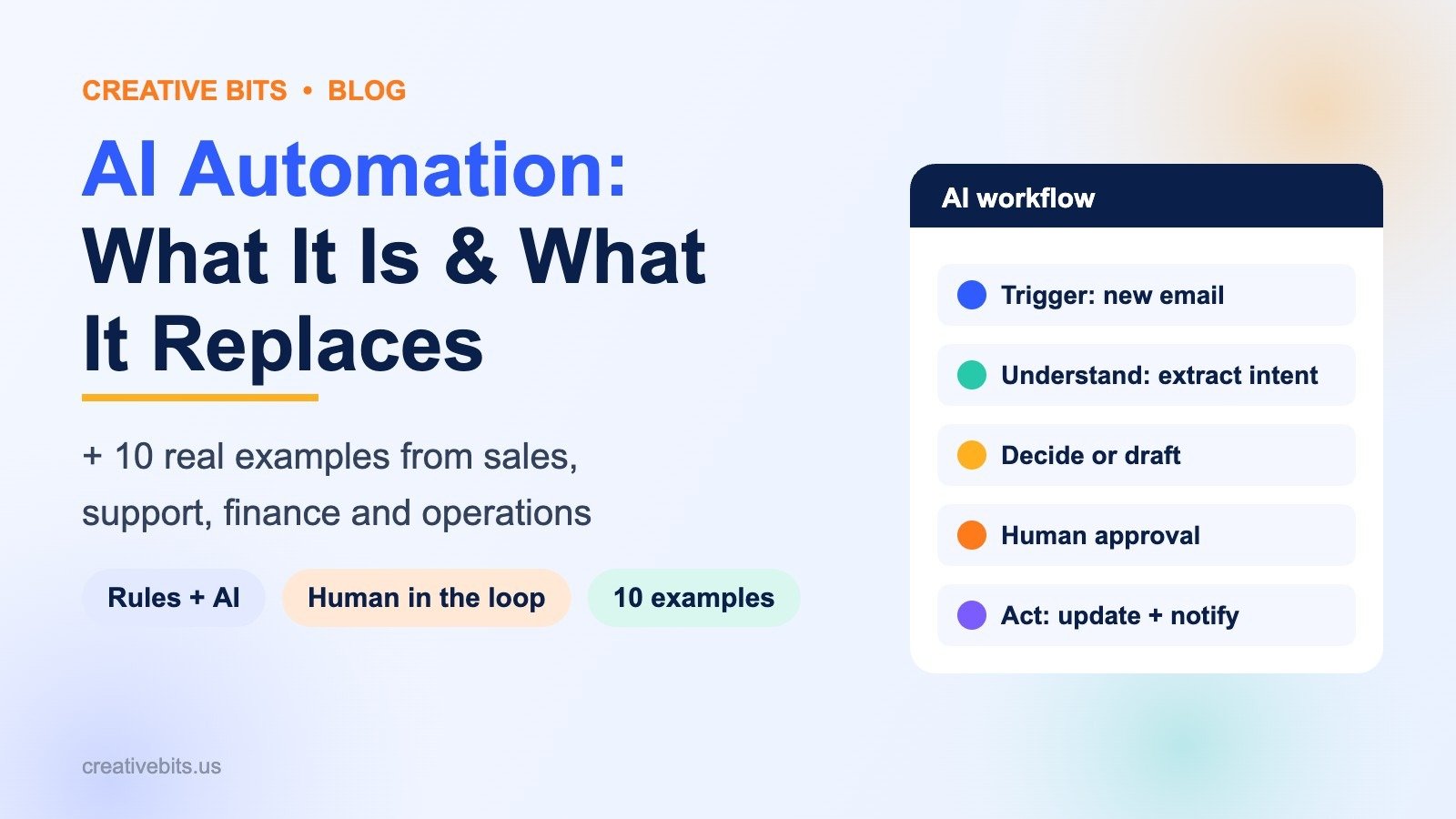
1. Trigger
Something happens: a new email, form entry, support ticket, uploaded file or closed deal.
2. Understand
An AI model reads the content and extracts what matters, such as intent, urgency, company, amount or due date.
3. Decide or draft
The AI classifies the item, scores it or drafts a response, following the instructions and examples you give it.
4. Act, with a human in the loop at critical nodes
The workflow tool updates records, assigns owners and sends messages. At the critical nodes of the workflow, such as just before a status update goes to a client, a payment is approved or a contract is changed, the item stops for a person to review and approve first.
What AI automation replaces
- Copying data from emails, PDFs and forms into the CRM, accounting tool or project board
- Sorting and routing incoming requests by hand
- First drafts of routine replies, summaries and reports
- Status chasing across tools and people
- Basic checks for missing fields, wrong amounts or expired dates
In short, it takes over reviewing and recommending next steps based on natural language, which is not possible with traditional rule-based methods. What stays with people is judgement, relationships and exceptions, which is where they add the most value.
10 AI automation examples
1. Lead qualification
New website leads are scored on company size, budget and intent, then routed to the right salesperson with a two-line summary. Replaces: a sales manager reading and assigning every lead.
2. Email triage
Incoming emails are tagged as sales, support, billing or spam, given an urgency, and moved to the right board or inbox. Replaces: someone sorting a shared inbox every morning.
3. Support reply to drafts
The AI drafts a reply from your help articles and past answers; an agent checks it and sends. Replaces: writing the same answers from scratch.
4. Invoice data entry
Supplier invoices arriving by email are read, and the supplier, amount and due date are entered into the accounting tool for approval. Replaces: manual keying and the typos that come with it.
5. Meeting notes to tasks
Call transcripts are summarized, and action items become tasks with owners and due dates on the project board. Replaces: someone writing up notes after every meeting.
6. Client onboarding
A closed deal triggers a welcome email, a project board built from a template, the team assignment and a kickoff checklist. Replaces: a 20-step manual checklist.
7. Document review
Contracts, applications or compliance forms are checked for missing fields, unusual terms or expiry dates, and flagged for review. Replaces: a first read of every document.
8. Weekly status reports
Project data is pulled from boards and turned into a plain-language update for leadership each Friday, which a manager approves before it goes out. Replaces: a manager compiling the report by hand.
9. CRM clean-up
Duplicate contacts are merged, missing fields are filled in, and records are tagged by industry and size. Replaces: periodic manual clean-up projects that never quite finish.
10. Recruiting screens
Applications are compared with the role’s must-haves, summarized and shortlisted for the hiring manager. Replaces: manually reading every CV in full.
Worked examples: where the time goes back
The estimates below start from published research on AI time savings, applied to typical volumes for teams of this size.
| Team | Process automated | Volume | What the research found | Estimated time back |
|---|---|---|---|---|
| 10-person sales team | Lead scoring, routing and CRM updates | 10 reps | Sellers using Microsoft Copilot for Sales reported saving about 90 minutes a week (Microsoft WorkLab). Reps spend about 70% of their time on non-selling tasks (Salesforce State of Sales) | About 65 hours a month across the team |
| 5-person support team | Email triage plus reply drafts | 600 tickets a month | Agents with an AI assistant resolved 14% more issues per hour, and 34% more for newer agents (Stanford and MIT study, NBER). Microsoft found a 12% cut in time per case | About 25–30 hours a month, assuming 20 minutes per ticket |
| Finance team of 3 | Invoice data entry with approval | 300 invoices a month | Manual processing takes about 10–15 minutes per invoice versus under 2 minutes automated (Ascend AP benchmarks). Average cost is $9.40 per invoice against $2.78 for best-in-class teams (Ardent Partners, 2025) | About 50 hours a month |
| Agency of 30 | Meeting notes to tasks | 40 client calls a month | Summarizing a meeting took about 11 minutes with AI versus 43 minutes without (Microsoft WorkLab) | About 20 hours a month |
The hours are our calculations from the published figures at these volumes. Your results depend on volume, how clean the inputs are and how much review you keep in place.
How to get started with AI automation
- Pick one process that is high-volume, repetitive, and well understood.
- Map the steps as they happen today, including who decides what and why.
- Automate the rules first, then add AI only where reading or judgement is involved.
- Mark the critical nodes, such as client-facing messages and financial decisions, and keep a person in the loop there.
- Measure hours saved and errors avoided, then move to the next process.
- Set guardrails: limit what data the AI can see, log every action, and never let it send money or contracts without approval.
If your process is mostly handoffs between steps rather than reading and deciding, start with digital workflow automation first and add AI later. For a wider view of what to automate, see which business automation solutions actually save time.
When an AI development partner helps
The AI features built into Zapier, Make, n8n and monday.com cover many workflows. A partner earns its fee when you need custom agents, connections to internal systems, high volumes, or governance your compliance team will sign off. Creative Bits has been building automation and monday.com systems from Syosset, NY since 2008, and our AI development services cover custom AI built around the tools you already use.
Frequently asked questions
What is AI automation in simple terms?
It is using AI to handle tasks that need some understanding, such as reading, sorting, extracting or drafting, so work moves through a process without a person doing every step.
How is AI automation different from regular automation?
Regular automation follows fixed if-then deterministic rules on structured data. AI automation can interpret unstructured information like emails, PDFs and call notes, then pass the result to those rules.
What does AI automation replace?
Repetitive tasks: data entry, sorting and routing, first drafts, status chasing and basic document checks. It does not replace judgement, relationships or decisions.
Will AI automation replace my staff?
It replaces tasks, not people. Teams usually move the saved hours into customer work, quality and higher-value projects.
What are the best tools for AI automation?
Common choices are monday.com, Make, Zapier and n8n, which all now include AI features alongside rule-based automations, often combined with a model such as ChatGPT or Claude. Custom builds are used when volume or security needs are high.
Is AI automation safe for business data?
It can be, with the right setup: limited data access, logging, and a human in the loop before anything is sent to a client, paid or signed.
How much does AI automation cost?
Tool costs are often small if you already use an automation platform, plus AI usage fees based on volume. The larger cost is design and setup, which is usually a fixed-scope project per process.
Want to know which of your processes are ready for AI automation? Book a free consultation or explore our AI development services.