monday.com Services
Is the monday.com Free Plan Really Enough to Run Your Team's Work?
Before you commit a credit card to any work management tool, you should know exactly what the monday.com free plan features unlock and what they don't. This guide covers the full monday.com free plan details, a quick comparison against paid tiers, and honest monday.com limitations so you can decide if free is enough or if you'll need to upgrade sooner rather than later.
What Features Are Included in the monday.com Free Plan?
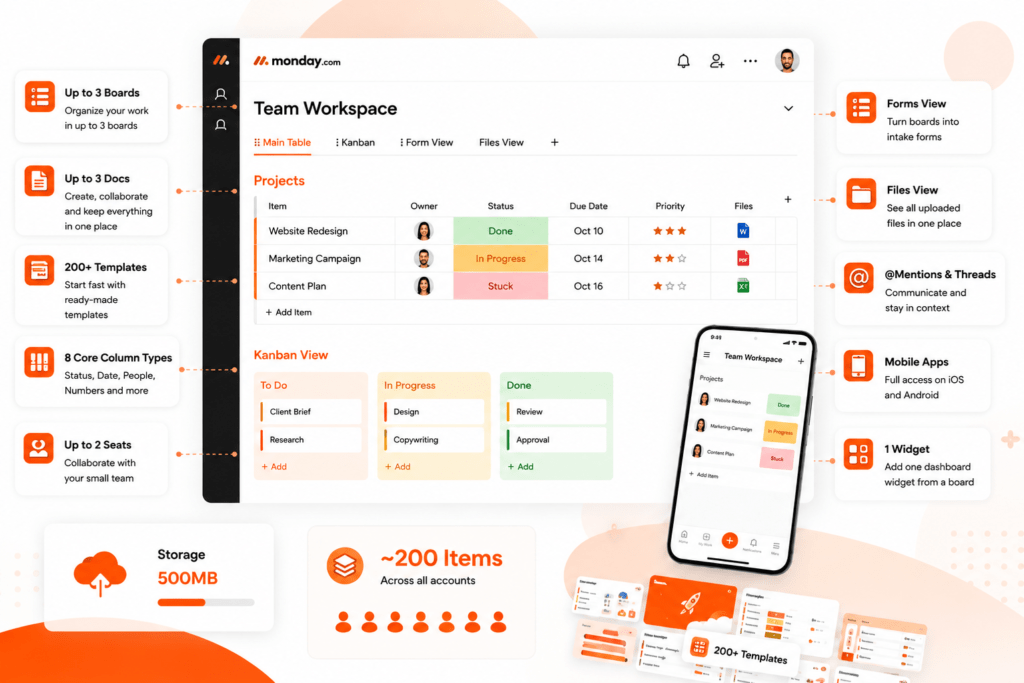
The monday.com free plan features include up to 3 boards, up to 3 Docs, and 200+ templates, so you're not starting on a clean slate. You get 8 core column types (status, date, people, numbers, and more), plus the Table and Kanban board views. Forms view and Files view are included too, letting you turn a board into an intake form and see every uploaded file in one place.
You also get a widget from one board, @mention and threads, and full support for iOS and Android mobile applications. The maximum number of items that can be created is around 200 items across all accounts, although an additional +100 can be added through each referral, up to a maximum of 800 (1000 in total). The amount of storage available is 500MB. In summary, with all the above monday.com free plan features, the package is truly usable.
Free vs. Basic vs. Standard: Quick Feature Comparison
Here's how the monday.com free plan features stack up against the first two paid tiers:
| Feature | Free | Basic | Standard |
| Seats | Up to 2 | 3+ (paid minimum) | 3+ (paid minimum) |
| Boards | Up to 3 | Unlimited | Unlimited |
| Items | ~200 (account-wide) | Unlimited | Unlimited |
| Views | Table, Kanban | Table, Kanban | + Timeline, Gantt, Calendar |
| Automations/Integrations | None | None | 250 actions/month |
| Guest access | No | No | Yes |
| Storage | 500MB | 5GB | 20GB |
How Many Users Can I Have on the monday.com Free Plan?
A monday.com free account is capped at two seats. It's the single most significant structural difference that exists between a free plan and all other plans. Unlimited viewers are included at no cost, so read only stakeholders don't count against your seats, but anyone who needs to create or edit items is limited to two people total. If you're a solo freelancer or a two person partnership, this ceiling may never matter. But adding a third person changes everything.
What Are the Limitations of the monday.com Free Plan?
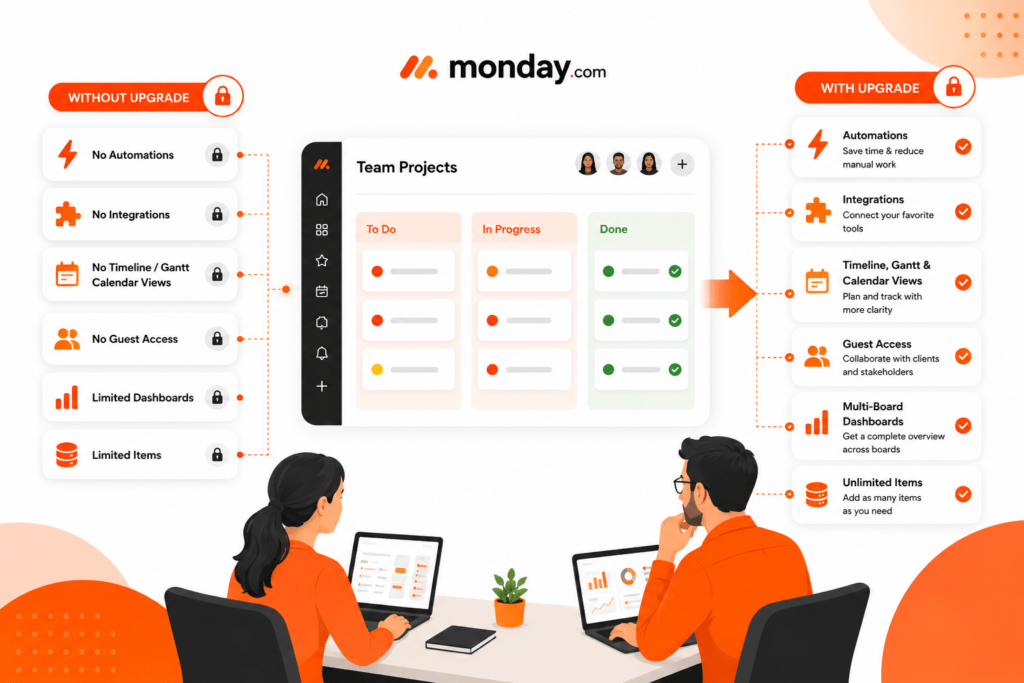
There are also other monday.com limitations in addition to the ones related to the number of seats. You will not have any automations or integrations, as both features are included starting from the Standard plan. You won't be able to use Timeline, Gantt, and Calendar views; you'll be limited to only Table and Kanban views. Formula and Time Tracking advanced columns are not free; guests are not allowed; you won't be able to get data from more than one board at a time using dashboards. This complaint is being discussed on Reddit as well.
Pros & Cons
Pros:
- No cost, no credit card, no time limit
- Clean interface with 200+ templates
- Full mobile app access
- Easy, data preserving upgrade path
Cons:
- Hard 2seat cap
- No automations, integrations, or guest access
- Limited to Table and Kanban views
- ~200item ceiling Accountwide
Who Should Use the Free Plan?
The monday.com free plan benefits are clearest for freelancers, solo consultants, and two person teams running simple task lists or light client work. This is also a wise method for testing the interface of the platform before making a purchase. Bigger teams, agencies working for multiple customers, or any Organisation in need of automation in order to reduce manual tasks will soon find that the free plan doesn’t satisfy their needs.
Can I Upgrade from the monday.com Free Plan to a Paid Plan?
Yes, and it's effortless. The upgrade process is done from the admin section of your account, and your existing boards, items, and files transfer automatically; no rebuilding needed. Subscription plans include Basic, Standard, Pro, and custom priced Enterprise, and the billing is on a per seat basis starting at 3 seats. If you want to test premium features like automations or Timeline view first, monday.com offers a monday.com free trial of the Pro plan directly from your dashboard before you commit to any monday.com pricing tier.
Does the monday.com Free Plan Offer Customer Support?
Yes. Free accounts get access to the same customer success team as paid accounts, but Pro and Enterprise users get faster and prioritised response times. For most people working through a simple two person setup, standard support is enough to resolve day to day questions.
Final Thoughts
The monday.com free plan is a valid tool for the right use case, not just a stripped down teaser. When you know the details of the monday.com free plan, such as how many seats, items, views, and limitations there are, you can build your workspace with some margin to spare, instead of rebuilding it later on. Whether free is "enough" really depends on your team size and how much manual work you're willing to do without automation.
If you end up outgrowing it, doing the migration and setup correctly is more important than the plan you would choose. Creative Bits, an Authorized monday.com Solution Partner, helps teams design workspaces and automations that actually fit how they work, instead of a generic template.

2. Does the monday.com free plan include automations?
No. Automations and integrations both start on the Standard plan.
3. Can I add guests on a monday.com free account?
No. The Free Plan does not allow guests or viewers. These access options are available on paid plans.
4. How many items can I create on the free plan?
The Free Plan starts with 200 items across the account. You can earn 100 additional items per successful referral, up to 800 additional items, for a maximum of 1,000 items.
5. Can I try premium features before paying?
Yes, via a free trial of the Pro plan, activated from your dashboard.
6. What happens to my data when I upgrade?
Nothing is lost - boards, items, and files transfer automatically.
7. Is the free plan good for growing teams?
It works well for solo users and two-person teams, but larger teams will quickly outgrow it because the Free Plan is limited to two seats and lacks automation, integrations, guest access, and several advanced views.
8. Does the free plan include mobile app access?
Yes, both iOS and Android apps are fully included.