monday.com Services
Can the monday.com Slack Integration Finally Kill Your Endless Status-Update Threads?
If your team spends its entire day in Slack but manages its work through boards, you probably have thought about how to prevent copying information from one to another. With a monday.com Slack integration, you will solve this problem effortlessly as it is specifically designed to help transfer updates, notifications, and new tasks from one channel to another without leaving the tab.
This guide covers how integrating monday with Slack works, what it gives your team, how much you can automate, and the setup steps, regardless of whether you are starting or improving your existing slack monday integration.
How Do I Integrate Monday.com with Slack?
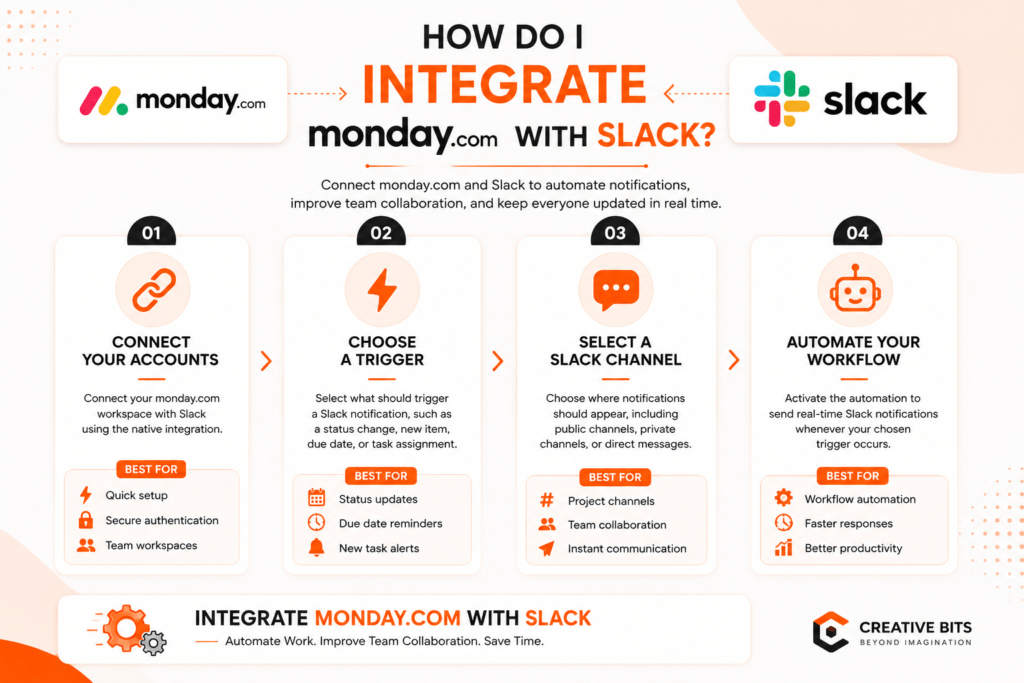
Monday com slack integration starts at the board level. Open the board, click on Integrate, then Create, and select the Slack integration banner. You'll see templates like "notify a channel on status change" or "notify a person when a due date arrives." You will need to authorize the integration; this will occur only once per workspace.
A monday.com can be linked to more than one workspace in Slack, although each workspace can be linked only to one account through shortcuts. Private channels need the monday.com app added manually from Slack's Integrations tab first, since monday.com and slack connections don't sync private spaces automatically.
Trigger → Slack Action → Benefit
| Trigger in monday.com | Slack Action | Benefit |
| Status changes to "Done" | Notifies channel/person | Instant visibility |
| Due date arrives/changes | Sends Slack alert | Nobody misses a deadline |
| New item via shortcut | Logs to your board | No task lost in chat |
| @monday.com mentioned | AI agent acts | Work done without switching apps |
What Are the Benefits of Using Monday.com Slack Integration?
The core benefit is that nobody has to leave their preferred tool to stay informed. Managers keep tracking work in boards while the team gets real-time visibility in Slack. Key benefits:
- Instant project visibility - status changes post directly to a channel
- Never miss a deadline - due date changes trigger automatic alerts
- Two-way communication - reply to notifications right inside Slack
- Fewer status meetings - updates sync automatically instead of requiring a check-in
This pairing is especially valuable for hybrid and remote teams where Slack is already the default hub, this integration of slack with monday keeps everyone in the loop without extra logins.
Can I Automate Tasks with Monday.com Slack Integration?
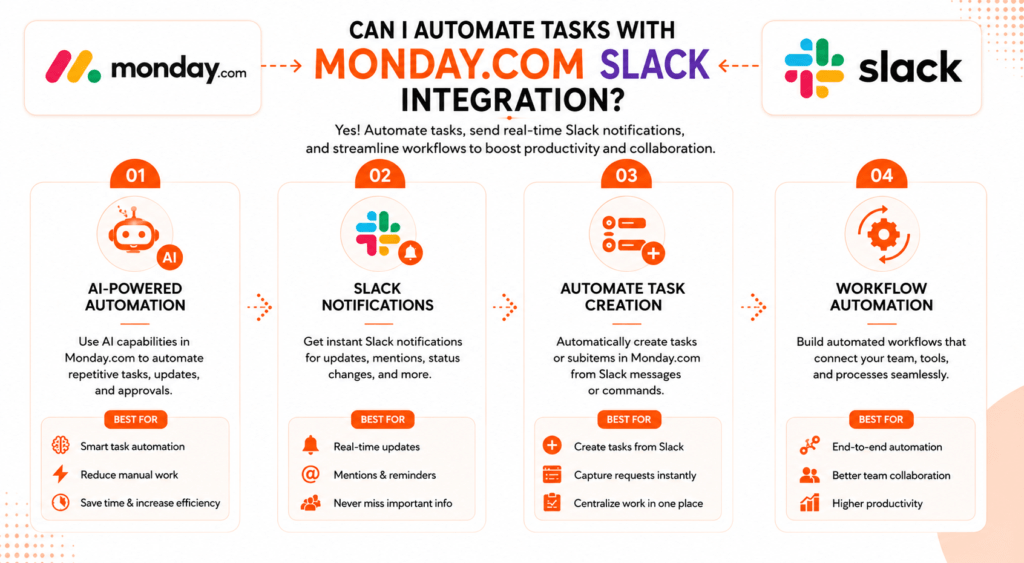
Yes, this is not only limited to notifications. Through Slack shortcuts, users who have access to the monday.com account can create a new task via a Slack message or add any update to a task that already exists.
In addition to this, monday.com also provides an AI Slack agent, who is @monday.com, and when you mention them anywhere in any channel or thread, they will be able to perform actions on behalf of you by understanding the context of the thread and then replying to you after that. By implementing this slack monday.com integration, you would be transforming Slack from an application that only notifies you into an application that performs actions for you. According to current documentation, it uses AI credits of monday.com.
How Does Monday.com Slack Integration Enhance Team Collaboration?
A well-planned monday.slack workflow makes it easier for teams to communicate and manage work in one place. Instead of sending direct messages to ask for updates, team members can simply check the connected Slack channel for the latest progress. You can choose whether notifications go to one person, a specific channel, or the whole team, making it easier for everyone to stay updated without extra messages.
What Are the Steps to Set Up Monday.com Slack Integration?
- Open your board and click Integrate
- Select Create, then choose the Slack integration banner
- Pick a template, like notifying a channel on status change
- Authorize the connection between monday.com and Slack
- Configure the template - message text and recipient
- Add the app to private channels manually, if needed
- Enable Slack notifications from your monday.com profile
Based on official information, basic Slack notifications are available in all tiers, while creation of items right from Slack needs the user to have the Standard tier or above. A basic monday.com and slack workflow can be live in about ten minutes once you know your plan supports the features you need.
Pros & Cons
Like any monday and slack integration, there are tradeoffs to weigh.
Pros
- Free basic notifications on any plan
- Cuts manual status updates and check-ins
- Two-way sync - act from Slack or monday.com
- AI agent completes tasks conversationally
Cons
- Item creation from Slack needs Standard or above
- Private channels need a manual setup step
- AI Slack agent consumes AI credits, needs AI enabled
- One Slack workspace fully links to only one account
Who Should Use the monday.com Slack Integration?
This monday.com integration is ideal for organizations that are currently using Slack as their means of day-to-day communications, while managing their deliverables from their monday.com boards, such as marketing, operations, project management, and development teams. It is great for remote and hybrid teams who need immediate visibility without additional meetings, as well as man. Solo users or teams rarely on Slack will see less value here.
Bringing It All Together
The monday.com Slack integration is one of the easiest ways to reduce manual status checks and keep everyone on the same page without adding another tool. The slack monday.com integration is especially useful to those already living in Slack, where it will take just minutes to set up and the actual benefits will come from how you use it.

2. Can one monday.com account connect to multiple Slack workspaces?
Yes, though shortcuts only support one linked account per workspace.
3. How do I connect a private Slack channel to monday.com?
Join the private channel, then manually add the monday.com app through Slack's Integrations tab.
4. Can I create new monday.com tasks directly from Slack?
Yes, the Slack shortcut lets you create new items or add updates without leaving the conversation.
5. Does monday.com send due date reminders to Slack?
Yes, a template can notify a person or channel automatically whenever a due date changes.
6.What is the monday.com Slack agent, and which plan supports it?
The monday.com Slack agent is an AI feature triggered by mentioning @monday.com in Slack. Availability may depend on your monday.com plan and AI settings, so check your current plan and account permissions.
7. Can I receive monday.com notifications directly in Slack?
Yes, once enabled in your profile's Notifications settings, updates appear as direct messages.
8. Can I mute monday.com notifications in Slack?
Yes, mute or unmute the monday.com app conversation anytime from your Slack sidebar.
9. Who can set up the monday.com Slack integration on a board?
Any user with board permissions, though account-wide notification settings only need enabling once.