monday.com Services
How can Monday.com workflows supercharge your business productivity?
Modern businesses deal with many tasks, approvals, updates, deadlines, and team handoffs every day. When these processes are done manually, work can slow down and become hard to track. Monday.com workflows automate processes, connect different steps, and give teams a clearer view of how work moves from start to finish.
With the workflow automation strategy, businesses can reduce repetitive work while improving task management, project management, and team collaboration. Monday.com provides a way to build workflows that are easy to see using triggers, conditions, actions, delays, and integrations. Its current workflow builder also has AI-powered capabilities to create and manage complex processes.
What are monday.com workflows? How do they work?
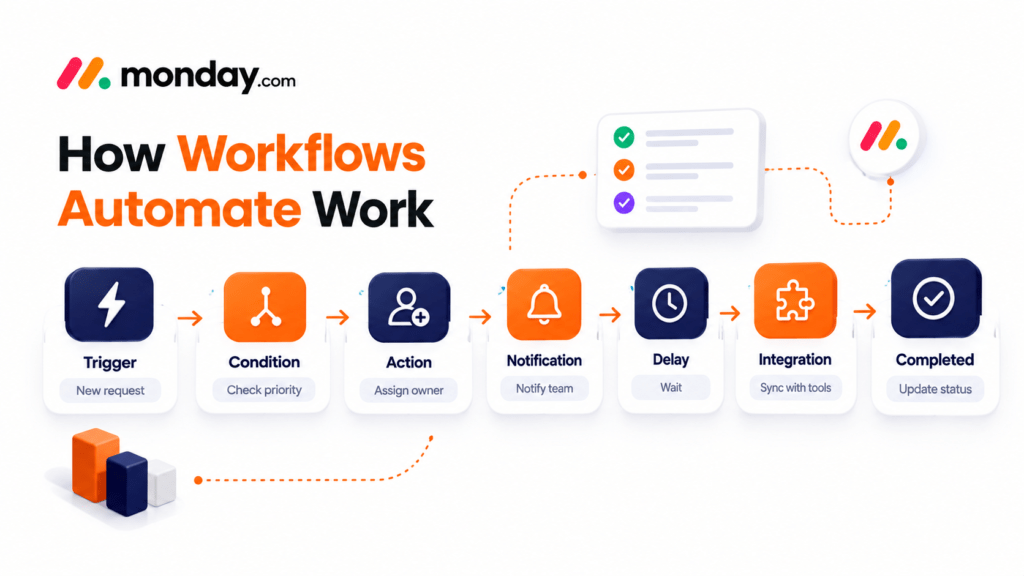
monday.com workflows are like a series of actions that help businesses automate how work moves through their processes. Instead of having employees do every step manually, a workflow can automatically respond when a specific event happens. For example, imagine a marketing team gets a campaign request. A workflow can create a task, assign it to the person, update the status, notify a stakeholder, and move the work to the next stage when the required condition is met.
The workflow builder uses blocks that can serve as triggers, conditions, and actions. Conditions can create paths depending on information like an item's status or value, while delays can pause a process before the next action. This makes monday.com workflows useful for everything from task management to complex operational processes. The key difference is that simple board automations are designed around trigger-action rules, while the workflow builder can support more complex multi-step processes across boards and functions.
How can you automate tasks with monday.com workflows?
The first step is to find work that follows a predictable sequence. Examples include assigning tasks when a project reaches a stage, sending approval notifications, creating follow-up tasks, updating project statuses, routing requests to the right team, moving information between connected processes, sending reminders before deadlines, and creating records after a specific event. Once you identify a process, you can map it into a workflow. Start with the event that should trigger the process, add conditions where decisions are needed, and then define the actions that should happen next.
The workflow builder also lets users create workflows from scratch or describe a process in language with AI-assisted workflow creation. After generating a workflow, users can configure individual blocks before publishing it. For example: when a new project request is submitted, check the project priority, assign the project manager, create tasks, notify the delivery team, wait until the planned start date, and update the project status. This type of workflow automation can remove handoffs while keeping everyone aligned.
What are the benefits of using monday.com workflows for your business?
 Reduce work: employees spend less time doing routine administrative tasks.
- Improve task management: automated task assignment and status updates make responsibilities clearer.
- Strengthen project management: automated processes can ensure the next step happens consistently when a milestone or condition is reached.
- Improve team collaboration: automated workflow actions can communicate changes, giving teams visibility into project progress and responsibilities.
- Create consistency: a documented workflow gives employees a clear process to follow.
- Support business growth: as a business grows, manual processes become harder to maintain. Monday.com workflows can help teams handle increasing volumes of work without increasing administrative effort.
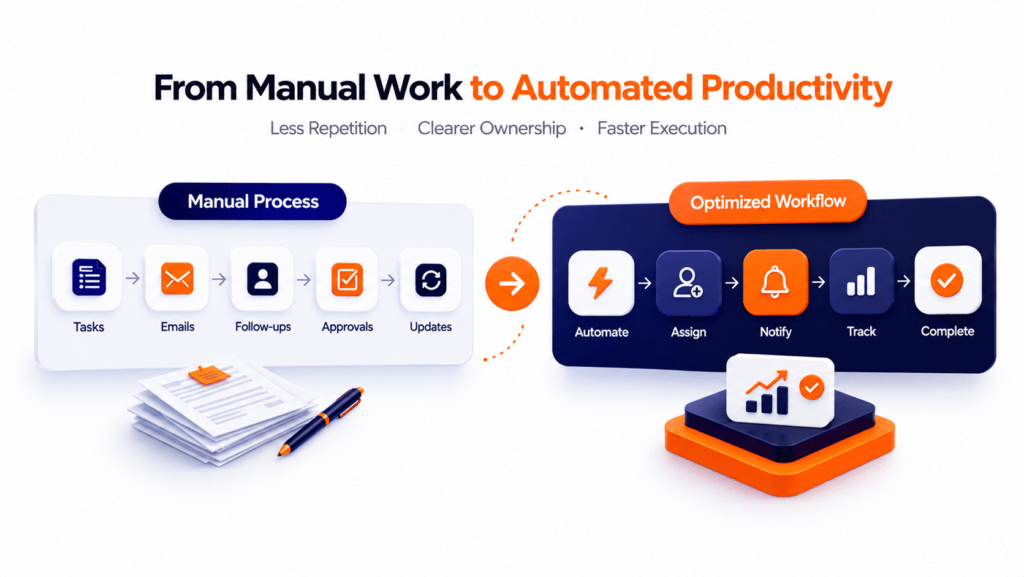
However, automation should not simply replicate a designed process. Effective workflow optimisation starts by identifying bottlenecks, simplifying steps, and then automating the improved process. That process-first approach aligns with Creative Bits workflow automation methodology.
Can you integrate monday.com workflows with tools and apps?
Yes, monday.com workflows can work alongside integrations that connect monday.com with platforms. Integrations can transfer information between platforms and support two-way synchronisation in applicable scenarios. This creates opportunities for broader workflow integration. For example, a business might connect its monday.com environment with email platforms, communication applications, spreadsheet systems, CRM platforms, customer support tools, accounting systems, internal business applications, or custom software through APIs.
The monday.com developer platform also lets developers create custom workflow blocks and fields. These blocks can function as triggers or actions. Pass information between workflow steps. This means monday.com integrations do not have to be limited to specific use cases. Businesses with specific requirements can explore custom integrations and API-based solutions.
How do you get started with creating custom monday.com workflows?
Creating custom workflows becomes easier when you start with the business process rather than the technology. Begin by asking five questions: What process takes the most manual effort? Where do delays occur? Which steps happen repeatedly, which decisions can be handled through clear conditions, and which systems need to exchange information? Next, document the process from beginning to end, remove unnecessary steps, and then build the workflow around a clear trigger, conditions, and actions. Test the workflow with scenarios before making it active.
Start small. Automating one high-value process is often better than creating a complicated system. As your needs grow, you can introduce advanced monday.com workflows, cross-board processes, integrations, AI-powered actions, and custom workflow components. For businesses that need implementation support, Creative Bits offers monday.com customisation, workflow automation, project management services, and ongoing support.
Final thoughts:
monday.com workflows can turn processes into structured, repeatable systems. From task management and project management to approvals, notifications, integrations, and cross-team processes, automation can help organisations spend less time managing work and more time completing it. The biggest benefit comes from combining automation with process design. When businesses first understand their processes, remove steps, and then create custom workflows, they can build a more scalable foundation for business productivity.
. They help by reducing the amount of work that needs to be done. They also help with routine updates, which makes it easier to see what is going on. This helps employees focus on important work. Yes, monday.com workflows can help automate tasks. They can create tasks, assign them to people, and even send reminders and notifications. Yes, teams can use monday.com workflows to automate parts of a project. They can use them to get approvals, assign tasks, and set deadlines. Automations are good for things like when something happens, and then something else happens. monday.com workflows are more complex and can handle many things. Yes, you can build monday.com workflows from scratch. You can set up triggers and actions and even add delays if you need to. Yes, monday.com workflows can connect with platforms. This means they can share information with apps. Yes, monday.com has a tool that can help create workflows. You can tell it what you want to do, and it will create the steps for you. You should start with processes that take a lot of time or involve many steps. Fix the process first, then automate it.
2. How do monday.com workflows improve productivity?
3. Can monday.com workflows help with task management?
4. Are monday.com workflows useful for project management?
5. What is the difference between automations and workflows?
6. Can you create custom monday.com workflows?
7. Can monday.com workflows connect with applications?
8. Can AI help create monday.com workflows?
9. How should you choose a process to automate?