monday.com Services
What Are the Best Project Management Tools for Managers? (The Ultimate Guide)
Managing a team without the right software today is a lot like driving cross-country without a map — you'll get somewhere, eventually, just not efficiently. Every manager juggles deadlines, resources, budgets, and people, and the difference between chaos and clarity usually comes down to one thing: the software behind the workflow.
If you've been searching for the best project management tools for managers, you're not alone. The project management software market keeps growing as more teams move away from spreadsheets and email threads to centralized platforms that show what's happening, who owns what, and where risks are hiding.
In this guide, we break down the best project management tools for managers in 2026, compare their real strengths and weaknesses, and answer the most common questions managers ask before choosing one.
Monday.com CRM Review
Monday.com is one of the most flexible, visual customer relationship management platforms built on the most talked-about work management platforms today, and it earns that reputation through color-coded, visual boards that make project status easy to read at a glance. Many managers evaluating "monday.com CRM" actually mean the broader Work OS platform—a flexible system you can configure to act like a lightweight CRM, a task tracker, or a full project management suite, depending on how you set it up.
What managers like:
- Drag-and-drop boards with multiple views — Kanban, Gantt, calendar, and timeline
- Over 200 pre-built automation recipes that handle repetitive status updates
- A large template library (100+ templates) that shortens setup time
- A strong integrations marketplace connecting Slack, Google Workspace, and more
Where it falls short:
- Resource management and profitability tracking are shallow compared to purpose-built PM software
- The free plan is capped at two seats, so small teams outgrow it quickly
- Heavy customization can eventually clutter the board view for larger teams
On pricing, monday.com's free plan covers up to two seats, the Basic tier adds storage and custom fields, Standard unlocks Gantt and timeline views, and Pro adds time tracking and private boards — so managers typically need at least the Standard tier before the platform feels fully capable for day-to-day project tracking.
For managers who want an intuitive, visual way to track cross-functional work without heavy administrative overhead, monday.com remains one of the strongest all-round picks among today's top 10 project management tools.
What Are the Top 5 Project Management Tools?
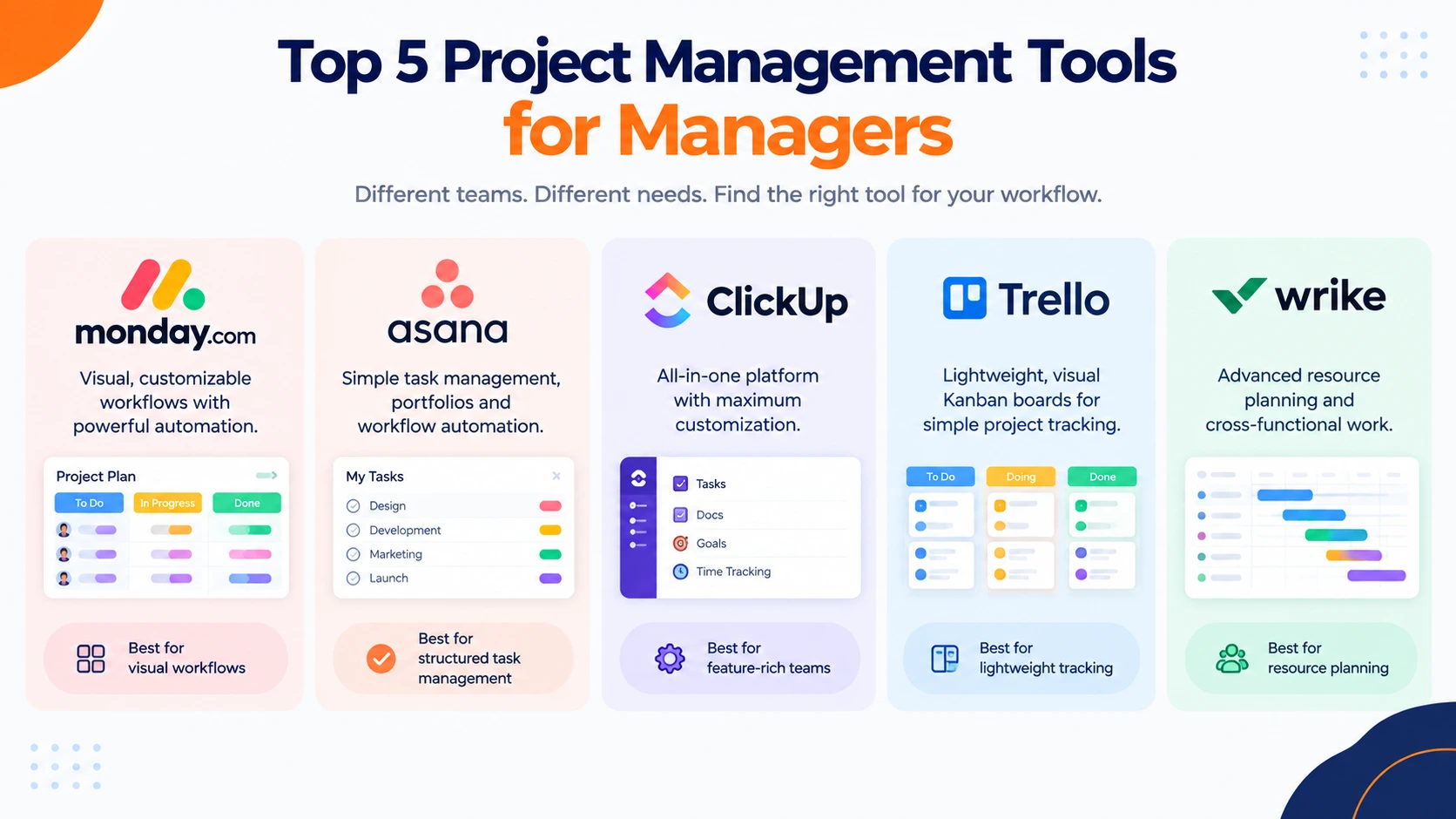
If you only have time to evaluate a handful of platforms, these five consistently top independent comparisons of project management software:
- Monday.com — best for visual, color-coded workflows and fast onboarding, a colorful, highly visual platform that offers flexible dashboards
- Asana — best for clean task management, portfolios, and workflow automation
- ClickUp — best for teams that want maximum customization inside one workspace
- Trello — best for lightweight, Kanban-only task tracking
- Wrike — best for cross-functional teams that need deeper resource planning
Each of these names appears again and again across reviews of the top 10 project management tools, and most offer a capped free tier — a big reason they also dominate lists of the top 10 project management tools free for small teams and startups on tight budgets.
Which Tool Is Best for Project Management?
There's no single universal "best" tool — the right answer depends on your team's size, workflow complexity, and budget. That said, a few patterns hold up across most independent evaluations:
- For visual planners and beginners: monday.com or Trello
- For structured task management and automation, and teams that need organized task management and workflow automation: Asana
- For software and engineering teams running sprints: Jira
- For agencies and client-facing teams, teams that actually work: Teamwork.com
- For enterprises needing deep resource and portfolio management, larger organizations that need advanced resource management: Wrike or Smartsheet
If your priority is finding the best project management tools for managers who oversee multiple projects and people — rather than code, tickets, or backlogs — monday.com, Asana, and ClickUp consistently rank at the top for ease of adoption and day-to-day usability, and AI tools used for different projects and give results according to projects
What Tools Should a Project Manager Use?
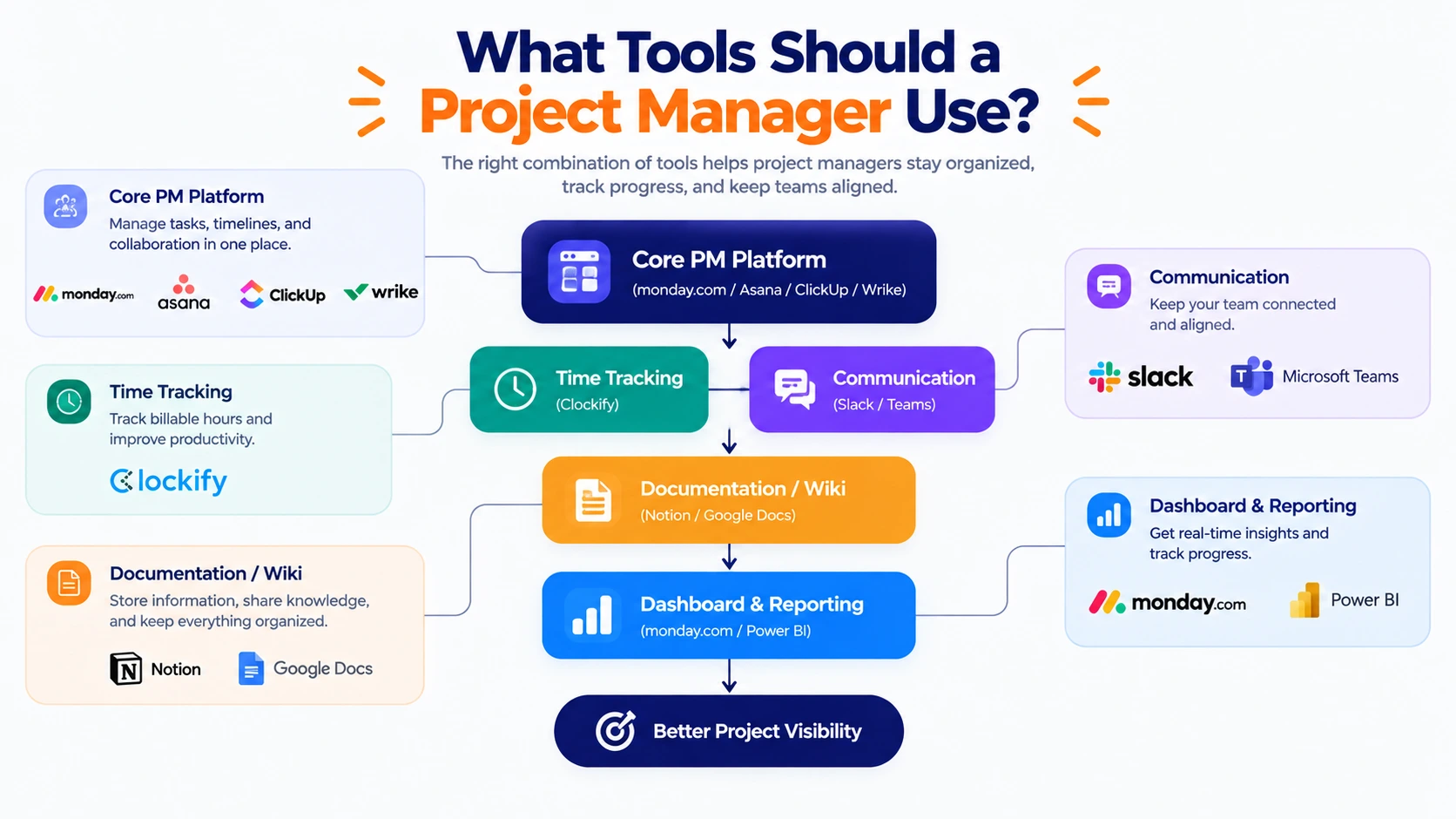
Beyond picking a single platform, a well-equipped project manager usually relies on a small stack rather than one tool trying to do everything:
- A core PM platform (monday.com, Asana, ClickUp, or Wrike) for tasks, timelines, and reporting, custom task views, docs, cross-functional team collaboration, and project tracking smoothly.
- A time-tracking tool [Clockify ] Best for unlimited users and keeping billable hours and team capacity accurate
- A communication tool (Slack or Teams) integrated directly into the PM platform, Interface & Organization, Integrations, Pricing
- A documentation or wiki space for SOPs, RAID logs, and recurring status reports; a digital workspace platform used by teams and organizations to create, organize, and collaboratively edit documentation
- A dashboard or reporting layer that translates raw task data into decisions for stakeholders
Managers searching for the best project management tools for managers free should know that most platforms above offer a genuinely usable free tier — just expect caps on users, storage, or automations that eventually push growing teams toward a paid plan.
Before locking in a stack, it's worth mapping out how each tool will actually get used day to day: who creates tasks, who approves them, how status updates reach stakeholders, and how new hires get onboarded onto the system. A tool that looks powerful in a demo but sits unused after week three isn't solving anything — adoption, not feature count, is usually the real test of whether a platform earns its place in a manager's toolkit.
What Are the Best Tools for Successful Project Management?
Software alone doesn't guarantee project success; these project management software tools provide for planning, tracking, and managing tasks :
Asana: best for general tasks and a user-friendly interface with robot task assignment, milestones, and workflow tracking
monday.com: comprehensive AI work platform, dashboard reporting and automations, integration, and AI agents and assistants
Jira: best for software development and agile teams handling complex backlogs, sprints
Trello: best for small teams and visual dashboards, automated updates, and flexible multi-project management
Microsoft Copilot: best for automating tasks, writing content, web browser, and Microsoft 365 applications
But the right combination of features dramatically improves the odds. Look for tools that offer:
Real-time visibility into task status, blockers, and approaching deadlines
Resource and capacity views so no one on the team gets quietly overloaded
Automation for repetitive status updates, reminders, and task handoffs
Reporting dashboards that turn raw activity into decisions leadership can act on
Flexible views — Gantt, calendar — so each team member can work the way they think best
Whether you compare just two platforms or work through a list of the top 20 project management tools before deciding, these five capabilities are the real differentiators between a tool that gets adopted company-wide and one that quietly gets abandoned after a month.
Final Thoughts
Choosing the best project management tools for managers isn't about picking whatever platform has the longest feature list — What really matters is finding a tool that fits the way your team handles work every day. Think about your team size, your budget, and the type of projects you run, then pilot two or three finalists with real work before committing long-term.
The tools covered above consistently rank among the best project management tools for managers in 2026, and nearly all of them offer a free tier, so there's little reason not to test-drive a few before you buy. AI tools are really helpful for project management, image generation, team meetings, etc
2. Is monday.com actually a CRM?
Not natively. Monday.com is a flexible work management platform that can be configured to function like a lightweight CRM, but it isn't purpose-built CRM software.
3. What are the best project management tools for managers free of cost?
Monday.com, Trello, Asana, ClickUp, and Wrike all offer functional free plans, though each caps users, storage, or automation at some point.
4. Which project management tool is best for agile teams?
Jira remains the go-to choice for software and engineering teams running Scrum or Kanban sprints.
5. What should a first-time manager look for in a project management tool?
Prioritize ease of use, clear task ownership, and reporting — advanced features matter far less than daily usability in the first few months.
6. How many project management tools should a manager use at once?
Most managers rely on one core PM platform paired with a time-tracking and a communication tool, rather than juggling several overlapping systems.
7. Are there any completely free project management tools for managers?
Yes — Trello, ClickUp, and monday.com all offer free-forever plans, though they're best suited to small teams with fairly basic needs.
8. What is the difference between task management and project management software?
Task management tools track individual to-dos, while project management software handles full project lifecycles — planning, resourcing, budgets, and reporting.
6. How many project management tools should a manager use at once?
Most managers rely on one core PM platform paired with a time-tracking and a communication tool, rather than juggling several overlapping systems.