monday.com Services
What Are Workflow Automation Services and How Do They Work?
Somewhere in your business right now, someone is copying data from one system into another by hand, chasing an approval over email, or re-entering the same information three different tools already have. That's the gap workflow automation services exist to close: connecting the tools and steps a process actually needs so work moves without a person pushing it along at every stage. This guide covers what workflow automation services actually involve, the tools behind them, real examples, and how to choose a partner who can build workflow automation that lasts.
What Is a Workflow Automation?
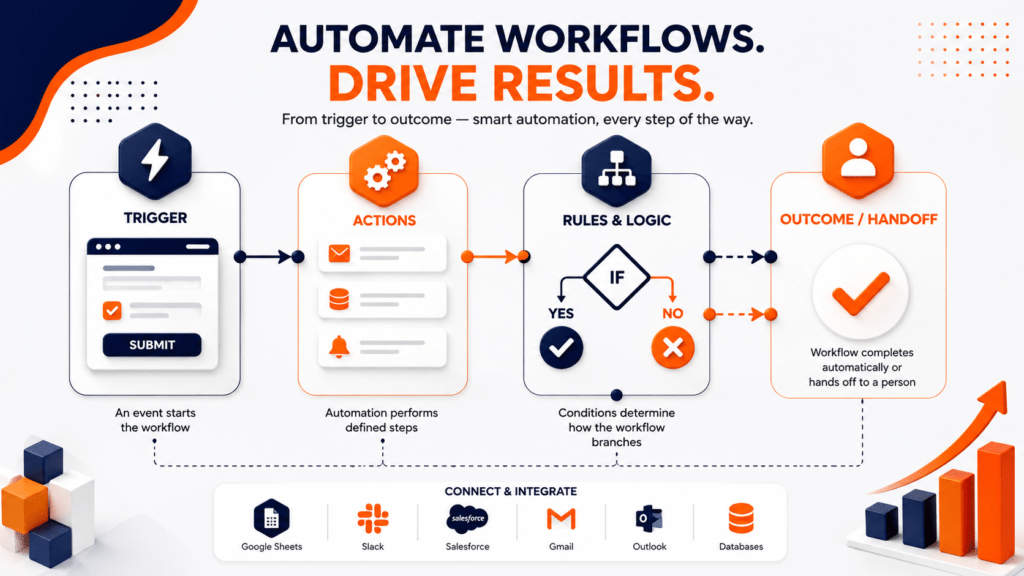
A workflow automation is software that carries out the steps of a business process automatically, based on rules a team defines once, instead of a person repeating those steps manually every time. When a form gets submitted, an invoice arrives, or a deal changes stage, the automation triggers, runs the necessary actions, and either finishes the task or hands it to a person only when a decision is genuinely needed.
Most workflow automation follows the same basic pattern:
Trigger — an event starts the workflow, like a new form submission or a status change.
Actions — the automation performs defined steps: sending a notification, updating a record, moving a task.
Rules and logic — conditions determine how the workflow branches, such as routing high-value invoices for manager approval.
Outcome or handoff — the workflow completes automatically or loops in a person for review.
This is different from automating a single task. Workflow automation coordinates a full sequence across people, systems, and departments, not just one repetitive click, which is exactly why most businesses hire workflow automation services rather than piecing this together alone.
What Is an Example of Workflow Automation?
Workflow automation shows up differently depending on the department, but the pattern is always the same: remove the manual handoffs between steps. Here are workflow automation examples and workflow automation services examples that are common across most businesses:
| Department | Workflow Automation Example |
|---|---|
| HR | New hire triggers onboarding: welcome email, equipment request, training schedule, account creation |
| Finance | Invoice received triggers data extraction, matching against a purchase order, and routing for approval above a set amount |
| Sales | Lead fills out a form, gets scored, and is automatically assigned to the right rep with a follow-up reminder |
| IT | Support ticket is categorized and routed to the correct queue based on keywords and urgency |
| Marketing | Prospect engages with an email, triggering a CRM update and a targeted follow-up sequence |
| Operations | Project status change on a board triggers a notification, updates a dashboard, and reassigns the next task |
These workflow automation services examples aren't hypothetical; they're the exact processes most businesses already run manually every day, just without the automation connecting the steps together. A good workflow automation example rarely looks impressive on its own — it's just one manual handoff quietly removed.
What Are the 4 Types of Automation?
Automation breaks down into four types, which helps explain where business workflow automation fits:
| Type | What It Means | Typical Use |
|---|---|---|
| Fixed automation | Hard-wired to perform one task repeatedly, with no flexibility | Manufacturing assembly lines |
| Programmable automation | Can be reprogrammed for different tasks, but requires setup between changes | CNC machines, industrial robots |
| Flexible automation | Adapts to a range of tasks with minimal reconfiguration | Mixed-production manufacturing |
| Intelligent automation | Uses AI and machine learning to make decisions and optimize processes over time | Business workflow automation, AI-driven RPA |
Most workflow automation services live in the intelligent automation category, since even simple approval routing tends to involve some level of rule-based decision-making, and increasingly, AI-assisted judgment calls too.
Workflow Automation vs. RPA vs. Business Process Automation
These terms get used interchangeably, but they're not the same:
Workflow automation coordinates the sequence of a process, routing approvals, updating records, and managing handoffs between people and systems.
Robotic process automation (RPA) automates individual, repetitive tasks by mimicking clicks and keystrokes, often used when no API exists to connect systems directly.
- Business process automation is broader still, transforming an entire end-to-end process, like customer onboarding, across multiple teams and workflows.
In practice, they're complementary, and most workflow automation services blend all three depending on the task. A single business process automation initiative might use workflow automation for the routing and logic, and RPA for the specific tasks that require interacting with a legacy system's interface.
Workflow Automation Services List: What's Actually Included
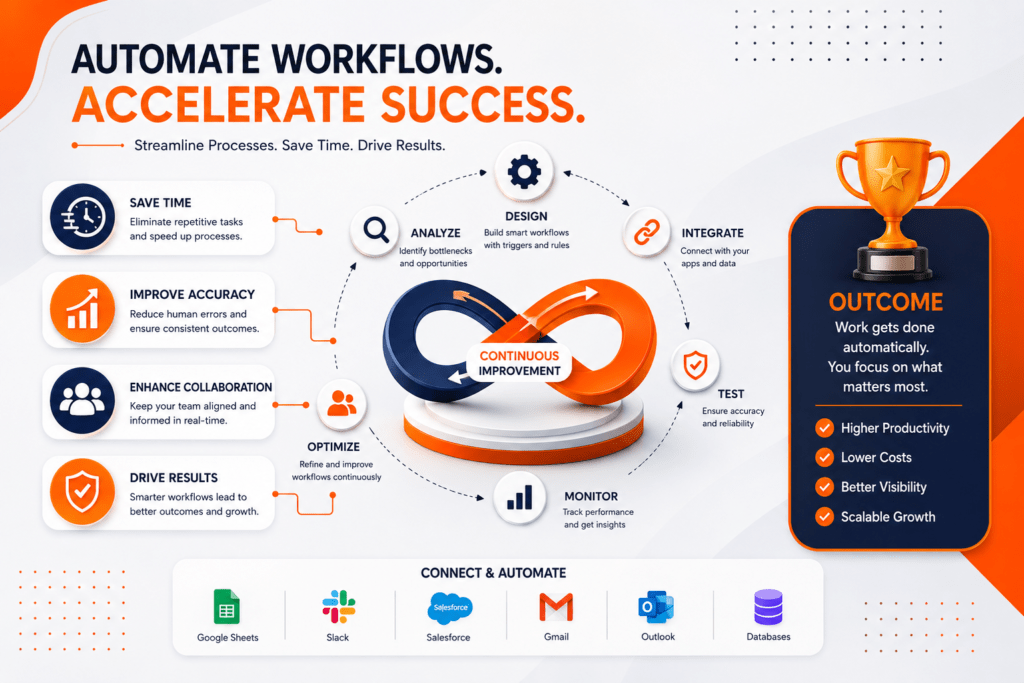
Not every provider offering "workflow automation services" delivers the same scope. A complete workflow automation services list typically includes:
| Service | What It Covers |
|---|---|
| Process mapping and analysis | Identifying bottlenecks and documenting the current manual workflow before building anything |
| Tool selection and setup | Choosing the right workflow automation software for the team's budget, tech stack, and technical comfort level |
| Custom workflow design and development | Building the actual automation logic, triggers, and integrations |
| System integration | Connecting the workflow automation tool to CRMs, ERPs, spreadsheets, and communication platforms |
| Testing and quality assurance | Validating the workflow against real scenarios before it touches live data |
| Training and change management | Making sure the team actually adopts the new process instead of quietly working around it |
| Ongoing support and optimization | Monitoring performance and adjusting the workflow as the business and connected systems change |
A short automation build without the surrounding pieces, mapping, integration, training, tends to become another underused tool within a few months, which is why a genuine workflow automation services list always includes support, not just setup.
Which Is the Best Workflow Automation Tool?
There's no single best workflow automation tool, and most workflow automation tools overlap in what they can do; the right one depends on your team's technical comfort, existing systems, and volume of work.
| Tool | Best For | Notes |
|---|---|---|
| Zapier | Broadest app coverage, fast setup | Simple pricing model, costs scale with usage volume |
| Make | Complex, visual workflows with conditional logic | Generally more cost-efficient at higher automation volume |
| Microsoft Power Automate | Teams fully inside the Microsoft ecosystem | Deep integration with 365 and Azure, less flexible outside it |
| monday.com | Teams that want automation built into their project management platform | Combines task tracking, boards, and automation in one place |
| n8n | Technical teams that want self-hosted control | Open-source, highly customizable |
| Ui Path | Rule-based tasks needing RPA, especially with legacy systems | Strong for enterprise-scale robotic process automation |
For most small and mid-sized businesses, the best workflow automation software is the one that connects cleanly to the tools already in daily use, rather than the one with the longest feature list. This is where good workflow automation services earn their fee: matching the tool to the team, not the other way around.
Workflow Automation with AI: What's Changing
Workflow automation with AI is shifting these systems from purely rule-based ("if this happens, do that") toward judgment-based. Instead of following fixed logic only, AI-enhanced workflows can read unstructured input like emails or documents, classify intent, predict which path a case should take, and flag exceptions a rigid rule set would miss.
This shows up in practical ways: an AI layer summarizing a support ticket before routing it, a model scoring a lead based on behavior instead of a fixed point system, or a document processor pulling structured data out of a scanned invoice. The automation still runs on triggers and rules underneath, but AI handles the parts that used to require a person's judgment.
IBM Business Automation Workflow BAW: Where It Fits
IBM Business Automation Workflow BAW is IBM's enterprise workflow platform, built by combining IBM's case management and business process management tools into one system. It's designed for large organizations running complex, high-volume processes that mix structured workflows with case-based work, and it's typically deployed as part of the broader IBM Cloud Pak for Business Automation suite, on-premises or in the cloud.
IBM Workflow automation tools like BAW make sense for enterprises with dedicated IT teams and legacy systems needing deep integration. For most small and mid-sized businesses, a platform like IBM Business Automation Workflow BAW is more infrastructure than the problem requires; lighter, faster workflow automation software usually gets a team to the same outcome without the long IBM Workflow automation implementation timeline.
Can ChatGPT Create Workflows?
Yes, with a caveat. ChatGPT can help design workflow logic and draft the rules a process should follow, and it can schedule recurring prompts through built-in task scheduling. What it can't do alone is reach into your CRM, update a spreadsheet, or move a task on a board.
To turn that logic into working workflow automation, ChatGPT needs an orchestration layer, a platform like Zapier, Make, or n8n, that can take its output and trigger real actions across connected systems. Used this way, ChatGPT becomes a strong drafting assistant for workflow automation services, while the automation platform handles execution.
Common Mistakes to Avoid With Workflow Automation Services
- Automating a broken process. Fix the workflow before automating it; automation just makes a bad process run faster.
- Skipping the mapping step. Automation without documenting the current process first leads to missed edge cases.
- Choosing tools before goals. Picking workflow automation tools based on popularity, rather than fit, wastes budget.
- No ownership after launch. Automations drift as systems change; someone needs to own monitoring and updates.
- Over-automating judgment calls. Not every decision belongs to a rule; some steps genuinely need a person.
How to Choose a Workflow Automation Services Partner
- Proven process mapping. A credible partner documents your current workflow before recommending software.
- Experience with your tech stack. Someone who already knows your CRM or project platform integrates faster.
- Transparent scope. Know exactly what's included, consulting, build, integration, training, support, before signing.
- A support plan beyond launch. Real workflow automation services shouldn't stop the day it goes live.
- Checkable references. Ask to see workflows built for a business your size, not just a polished case study.
Why Creativebits Delivers Workflow Automation Services That Actually Get Used
Most workflow automation services stop at connecting two apps together. Creativebits starts by mapping how your team actually works, then builds workflow automation around that, not around a generic template.
Our workflow automation practice covers both halves of the process: Process Mapping and Automation Design, where we identify bottlenecks and document the ideal workflow, and Automation Setup and Integration, where we build approval flows, reminders, and task routing using tools like Make.com, Zapier, and n8n. As a certified partner across monday.com, Make, and n8n, we're not guessing at how these platforms behave in production; we're implementing within their supported best practices.
Because a lot of workflow automation lives inside project and task management, our monday.com services team builds automation directly into boards and dashboards as an Authorized Solution Partner, so approvals, notifications, and status updates happen where teams already track their work. Our AI development solutions extend this further, adding workflow automation with AI, classification, and data processing into workflows that need more than fixed rules. And because rollouts drift without structure, our PMaaS practice keeps workflow automation services projects on schedule with a defined methodology and transparent reporting, rather than an open-ended engagement with no clear finish line.
Ready to Automate the Work That's Slowing You Down?
The businesses that get the most out of workflow automation services aren't the ones with the fanciest tools; they're the ones who mapped the process properly before building anything. Whether you need a single approval flow automated or a full audit of where manual work is quietly costing your team hours every week, Creative bits can help.
Reach out for a free consultation and we'll walk through your current workflows, your tools, and what a realistic first automation should look like, alongside our broader AI development, monday.com implementation, and project management support.

2. What is an example of workflow automation?
A common example is a new hire onboarding workflow: submitting a hire form triggers a welcome email, an equipment request, a training schedule, and account creation automatically, all without HR touching five separate tools.
3. What are the 4 types of automation?
The four types are fixed automation (hard-wired for one repeated task), programmable automation (reprogrammable with setup between changes), flexible automation (adapts with minimal reconfiguration), and intelligent automation (uses AI to make decisions and optimize over time).
4. Which is the best workflow automation tool?
There's no single best tool; Zapier suits broad app coverage and fast setup, Make handles complex conditional logic, Power Automate fits Microsoft-based teams, monday.com combines automation with project tracking, n8n suits technical self-hosted teams, and UiPath handles RPA-heavy enterprise work.
5. Can ChatGPT create workflows?
ChatGPT can help design workflow logic and draft rules, but it can't independently update a CRM, spreadsheet, or board. It needs an orchestration platform like Zapier, Make, or n8n to turn that logic into a working, connected automation.
6. What's the difference between workflow automation and RPA?
Workflow automation coordinates a sequence of steps across people and systems, while robotic process automation (RPA) automates individual repetitive tasks by mimicking clicks and keystrokes, often when no API connection exists.
7. What's the difference between workflow automation and business process automation?
Workflow automation focuses on the sequence and logic of a specific process, while business process automation is broader, transforming an entire end-to-end process like customer onboarding across multiple teams and workflows at once.
8. How much do workflow automation services cost?
Cost depends on scope: a single automated approval flow costs far less than a multi-department rollout with system integration, testing, and training. Most providers scope pricing after mapping the current process and identifying which systems need to connect.