monday.com Services
DevOps workflow automation is the difference between teams that ship reliably and teams that ship anxiously. In the cloud, automation feels almost effortless. Managed CI/CD runners spin up on demand, dependencies pull from public registries, and webhooks trigger pipelines the moment code is committed. But for organizations running on-premises, in regulated industries, government, finance, defense, or critical infrastructure, that convenience disappears. The internet connection that cloud automation takes for granted is exactly what these environments are designed to restrict.
That does not mean on-premises teams have to settle for manual processes. It means automation has to be designed differently. The principles of DevOps workflow automation still apply, but the implementation requires intention. Below are three practical tips for building reliable, automated DevOps workflows in on-premises and air-gapped environments, using the right tools and practices.
Why On-Premises DevOps Workflow Automation Is Different
Before the tips, it helps to understand why on-premises automation is its own discipline. In a connected environment, pipelines depend on external services: public package registries, cloud-hosted runners, and SaaS integrations. In an isolated environment, none of that is guaranteed. According to hoop.dev, developers must manually synchronize code changes between external and internal networks using offline media, and automated webhooks commonly used in cloud-based systems must be replaced with internal job schedulers or event-driven mechanisms.
The result is that many on-premises teams end up with partial automation. They have a build server, but deployments still require manual steps. Infrastructure changes still involve tickets and waiting. The promise of DevOps remains half-fulfilled. The fix is not more tools. It is the right tools, configured for offline reliability, and the discipline to automate the steps that matter most.
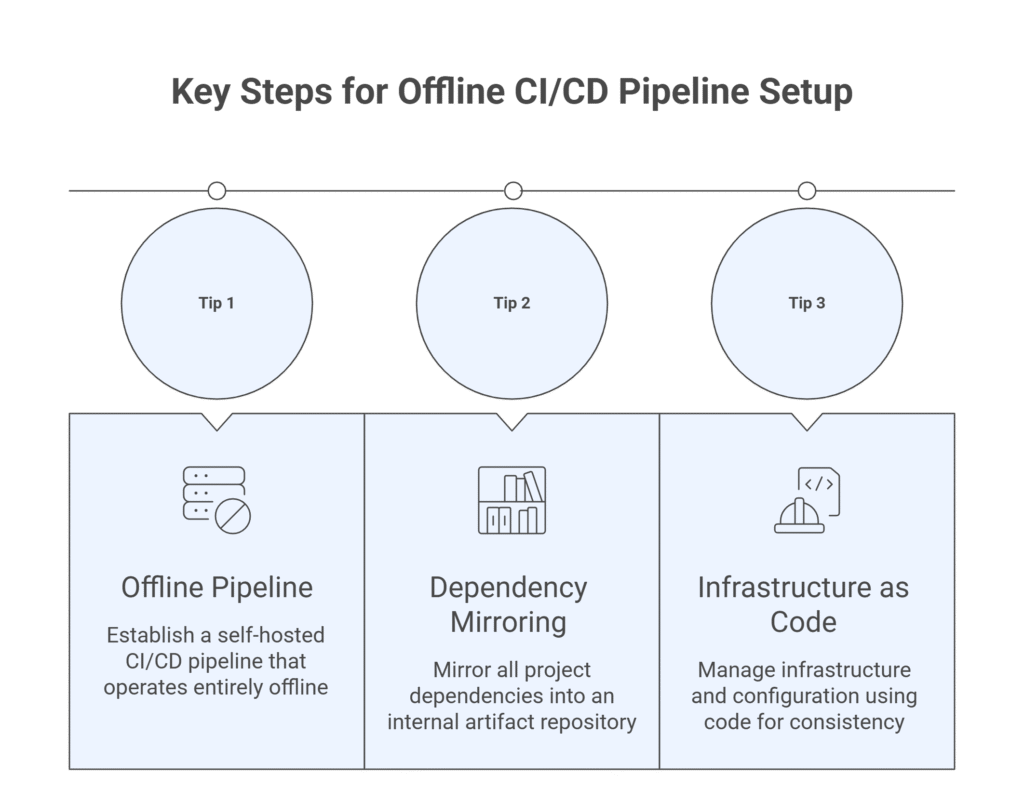
Tip 1: Build a Self-Hosted Pipeline That Works Entirely Offline
The foundation of on-premises DevOps workflow automation is a CI/CD pipeline that does not depend on external connectivity. Cloud-hosted runners are not an option in an air-gapped network, so the pipeline itself must live inside the secure perimeter.
Self-hosted tools are built exactly for this. According to ONES.com and Obsium, self-hosted tools like Jenkins, GitLab, or ArgoCD are excellent for building and deploying code offline, and should be pre-configured for offline use to reduce downtime during configuration changes. For Microsoft-centric organizations, there is a native option as well. Azure DevOps Server is the on-premises version of Azure DevOps Services, offering comprehensive CI/CD capabilities with build and release pipelines that can be fully configured for offline operation.
The practice that matters here is replacing cloud triggers with internal ones. Instead of webhooks that fire from a public Git host, use internal job schedulers or event-driven mechanisms inside your network. The goal is a pipeline that builds, tests, and deploys without ever reaching for the internet, so that isolation never becomes a bottleneck.
Tip 2: Mirror Your Dependencies With an Internal Artifact Repository
The single biggest failure point in on-premises automation is dependency management. Modern software pulls from npm, pip, Maven, NuGet, Docker registries, and more. In an isolated environment, none of those are reachable, and a pipeline that cannot resolve its dependencies cannot run.
The solution is an internal artifact repository that mirrors what your builds need. Create mirrored versions of external repositories for dependencies and container images, using tools like Artifactory or Nexus Repository as your private, offline registry, and automate the synchronization of those mirrors on a predictable schedule. This lets your pipelines pull everything locally, at full speed, with no external calls.
The discipline that makes this work is controlled updates. Leading tools provide robust internal repositories for storing Docker images, Helm charts, and language-specific packages, and often include tools for proxying or mirroring external repositories, allowing administrators to selectively import and update necessary packages in a controlled manner before bringing them into the secure environment. Security patches and new versions enter on your terms, reviewed and validated, rather than flowing in automatically. This is automation and governance working together, not against each other.
Tip 3: Manage Infrastructure and Configuration as Code
The third tip is the one that turns automation from a convenience into a competitive advantage: treat your infrastructure and configuration as code. Manual server configuration is slow, inconsistent, and especially error-prone under pressure, exactly the conditions under which on-premises teams operate.
Infrastructure as Code (IaC) solves this. According to DevOps.com, tools like Ansible automate configuration management, software installation, and system updates across multiple machines, letting teams define desired system states using YAML-based playbooks. Configuration management tools bring the same benefit. With configuration management, teams can define and enforce consistent setups across on-premises and cloud environments, reducing time-consuming manual configurations and ensuring reliable and reproducible deployments.
The payoff compounds. When your infrastructure is code, every environment, development, staging, and production is reproducible from a single source of truth. Onboarding a new server becomes a script, not a checklist. Recovering from failure becomes a rebuild, not a scramble. And every change is versioned, reviewable, and auditable, which matters enormously in the regulated industries where on-premises environments are most common.
The Results On-Premises Automation Can Deliver
These three tips are not theoretical. Teams that commit to them see dramatic improvements, even in the most restricted environments. One air-gapped team that implemented GitLab for CI/CD, local package mirrors, and automated security scanning improved deployment frequency by 90 times while reducing failed deployments by 75%, moving from annual software drops to monthly updates.
That is the real promise of DevOps workflow automation on-premises. Not cutting corners on security to gain speed, but engineering both at once: faster, more reliable delivery inside the secure perimeter your organization requires.
Bringing It All Together
On-premises DevOps workflow automation comes down to three disciplines working together. Build a self-hosted pipeline that runs entirely offline. Mirror your dependencies in an internal artifact repository with controlled updates. And manage your infrastructure and configuration as code so every environment is reproducible and auditable.
The organizations that get this right do not see their isolation as a limitation. They see it as a design constraint that, handled well, produces systems that are more secure, more consistent, and more resilient than many cloud-native setups. The internet connection was never the point. Reliable, repeatable, automated delivery was.
The Takeaway
DevOps doesn't fail because a team is on-premises. It fails when on-premises teams try to automate the cloud way, then give up when the connectivity isn't there. Design for offline from the start, and automation becomes not just possible, but a genuine advantage.
Are you ready to automate your on-premises or hybrid DevOps workflows?
At Creative Bits, we help enterprises design workflow automation that fits their real environment, including the secure, regulated, and on-premises setups where off-the-shelf cloud automation falls short. Explore our Workflow Automation services or AI Development & Solutions to see how we can help.
👉 Book a strategy session with our team to map your automation roadmap.