monday.com Services
Which Monday.com Integrations Are Right for Your Business?
If your team runs on monday.com but still copies data between five other tools by hand, you're leaving most of the platform's value on the table. monday.com integrations are what turn a good project board into a system that actually replaces your app-switching. This guide covers what monday.com integrations exist, the three ways they're built, whether AI and API access are part of the picture, and how to pick the right ones without breaking your existing setup. By the end, you should know exactly which monday.com integrations are worth setting up first.
What Integrations Does Monday.com Have?
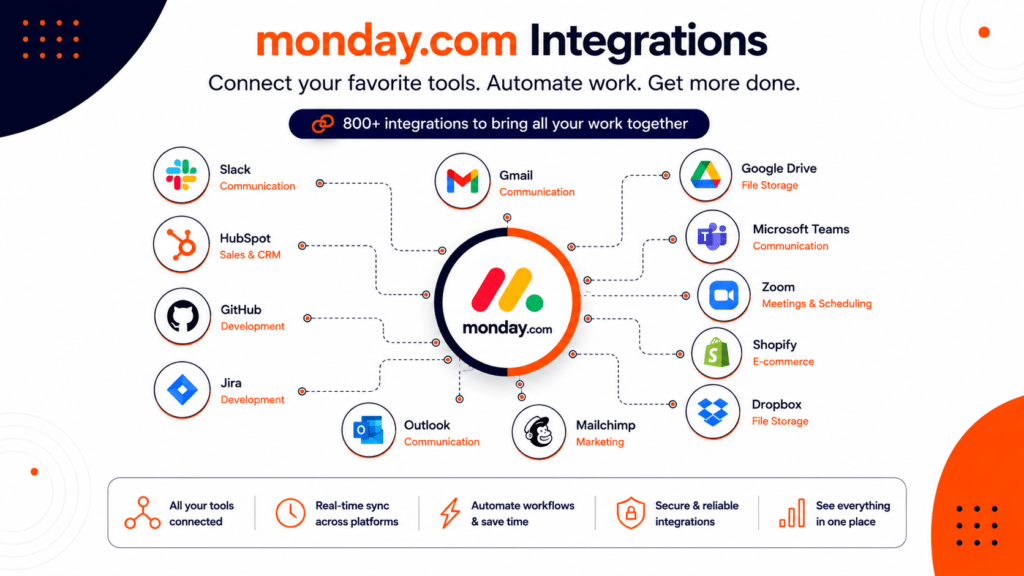
monday.com's marketplace now lists more than 800 integrations and apps, connecting boards to the tools teams already run day to day. If you scan the monday.com integrations list, they generally fall into a handful of categories:
Sales & CRM: Salesforce, HubSpot, and monday's own CRM data flow directly into boards, so pipeline updates don't require re-entering data twice
Communication: Slack, Microsoft Teams, Gmail, and Outlook sync messages, threads, and email into items and updates.
- Development: GitHub, GitLab, and Jira link pull requests, bugs, and sprints to related items, which matters if you're specifically hunting for monday.com integrations GitHub support.
- File storage & design: Google Drive, Dropbox, OneDrive, and Figma attach and embed files directly on boards.
- Marketing : Mailchimp, Google Ads, and Canva push campaign data and creative assets into one workspace.
- Meetings & scheduling: Zoom and Google Calendar turn meeting notes and due dates into trackable items.
- Every one of these monday.com integrations is designed to do one thing: keep work visible in a single place instead of scattered across a dozen logins. If you want the full, current monday.com integrations list rather than a summary, the in-app marketplace is searchable by category and lets you filter to only the integrations relevant to your plan.
What Are the Three Types of Integrations?
Not every integration works the same way, and understanding the three types helps you pick the right approach for your team.
Native, built-in integrations. These live inside the board's integration center and connect with a few clicks, no code required. Slack, Gmail, and Zoom fall into this category, and they're the fastest way to get monday.com integrations running.
- No-code integration platforms. Tools like Zapier, Make, and Integrately connect monday.com to thousands of apps that don't have a native integration yet, using triggers and actions instead of custom code. This is how most teams reach tools outside monday's direct marketplace.
- Custom, API-built integrations. For workflows too specific for the first two types, developers can build directly against monday's GraphQL API, webhooks, and SDKs to create a fully custom integration or a private app.
- Most businesses end up using all three types at once: native integrations for the basics, a no-code platform for the gaps, and a custom API integration for the one workflow that's genuinely unique to how they operate.
Best monday.com Integrations by Team
Not every team needs the same connections. Here's where the best monday.com integrations tend to concentrate by function.
| Team | Best Integrations | What It Solves |
|---|---|---|
| Sales | Salesforce, HubSpot | Pipeline visibility without duplicate data entry |
| Support | Zendesk, Slack | Tickets and customer updates in one workspace |
| Development | GitHub, GitLab, Jira | Code and sprint status linked to project items |
| Marketing | Mailchimp, Canva, Google Ads | Campaign performance and assets in context |
| Operations | Google Drive, Outlook, Zoom | Files, email, and meetings tied to active work |
| E-commerce | Shopify | Orders and fulfillment tracked alongside operations |
When teams ask what the best monday.com integrations are, the honest answer is: whichever ones remove the manual step you're currently doing twice.
Monday.com Shopify Integration: Running E-commerce From Your Boards
The monday.com Shopify integration is one of the more requested connections for growing e-commerce brands, and it's worth calling out separately. Once connected, new Shopify orders can automatically create items on a monday.com board, complete with order details, fulfillment status, and customer information pulled straight from the store.From there, teams can build workflows around it: routing high-value orders to a priority group, flagging refund requests for review, or syncing subscription renewal dates so nothing slips. Because the sync runs in real time, whoever owns fulfillment isn't toggling between Shopify's admin panel and a separate tracking sheet just to know what shipped today.
Does Monday.com Have AI Integration?
Yes. monday.com has built AI directly into the platform through features like monday sidekick and AI agents, and it also supports monday.com integrations with external AI assistants such as Claude, Copilot, and ChatGPT through official connectors and the monday MCP (Model Context Protocol).
In practice, this means AI can summarize a board, draft an update, generate a status report, or act on a workflow without a person manually pulling the data first. For teams already using AI tools elsewhere, these integrations mean monday.com becomes another surface those assistants can read from and write to, rather than a separate silo the AI has no access to.
Does Monday Have API Integration?
Yes, and this is the piece that makes fully custom monday.com integrations possible. The monday.com API is built on GraphQL, which uses a single endpoint and lets developers request exactly the data they need instead of pulling oversized, fixed responses.
The monday.com API supports reading and writing boards, items, columns, updates, and users, and it pairs with webhooks so external systems get notified the moment something changes on a board. This is the foundation behind most custom monday.com integrations, private apps, and marketplace listings, and it's documented in full through monday's public developer reference for teams that want to build something the marketplace doesn't already offer.
Monday.com Products and Pricing: What You're Integrating Into
Before choosing integrations, it helps to know what you're actually connecting them to. monday.com products span five core areas: Work Management (the original project and task platform), CRM (pipeline and deal tracking), Dev (built for software teams), Service (IT and support tickets), and Campaigns (email marketing).
monday.com pricing runs on a per-seat model with a three-seat minimum. Work Management plans span Basic, Standard, Pro, and Enterprise tiers, with CRM and other products priced separately. Higher tiers unlock more integrations and higher API request limits, so understanding monday.com pricing tiers matters just as much as picking the integrations themselves, since it's worth checking which plan includes the specific monday.com integrations your workflow depends on before committing.
Managing Your monday.com Integrations After Login
A surprising number of people search "monday.com integrations login" simply because they can't find where integrations live once they're signed in. Once you log in to monday.com, integrations live inside each board under the integration center, accessible from the icon in the top toolbar, not from a separate settings page. From there you can add, edit, or remove any active integration without affecting the rest of the board's setup.
It's worth checking this screen periodically, since permissions and account access change as people join or leave a team. An integration connected under a former employee's login can quietly stop working the moment that account is deactivated, which is a common and avoidable cause of "why did this automation break" support tickets. If your monday.com integrations login access is shared across multiple admins, review who actually owns each connection at least once a quarter.
Common Mistakes to Avoid When Setting Up monday.com Integrations
- Connecting everything at once. Adding ten integrations in a single afternoon makes it hard to trace which one is causing a sync issue later.
- Ignoring field mapping. A column type mismatch between monday.com and the connected tool is the most common cause of broken or partial data.
- Skipping a test run. Always trigger new monday.com integrations on a test item before letting them run on live customer or financial data.
- Forgetting ownership. Integrations tied to one person's login create risk if that person leaves; use a shared or admin account where possible.
- Not documenting the setup. Six months later, nobody remembers why a specific integration exists, which makes troubleshooting far slower than it needs to be.
How Creativebits Helps You Get More From monday.com Integrations
Setting up monday.com integrations is easy in a demo and messy in practice, once real boards, real data, and real edge cases are involved. This is where Creativebits comes in.
As an Authorized Solution Partner for monday.com, Creativebits handles custom implementation, custom monday.com integrations, and cleanup for teams whose boards have grown faster than their structure. Our workflow automation practice goes beyond monday's native connectors, building automations with Make.com, Zapier, and n8n to reach tools that don't have a one-click integration, and mapping the process first so the automation actually matches how the team works.
For businesses running AI-assisted workflows, our AI development solutions team can connect custom AI tools and data processing directly into monday.com boards, extending what native AI integrations offer out of the box. And because a messy rollout is often a project management problem as much as a technical one, our PMaaS practice keeps integration projects on schedule using a defined methodology instead of ad hoc effort. We've also built TimeBits, our own time-tracking app for monday.com, so we understand the platform from the inside, not just as an outside vendor connecting to it.
Ready to Fix Your monday.com Integrations?
The gap between "monday.com has an integration for that" and "our team actually uses it correctly" is where most of the platform's promised time savings get lost. Whether you need help choosing the right monday.com integrations, building a custom one through the API, or cleaning up monday.com integrations that have grown unmanageable, Creativebits can help.
Reach out for a free consultation and we'll walk through your current boards, your tool stack, and what a properly connected monday.com workspace should look like for your team.
The three types are native, built-in integrations that connect with a few clicks from the board's integration center; no-code integration platforms like Zapier, Make, and Integrately that bridge monday.com to apps without a direct connector; and custom, API-built integrations developed against monday's GraphQL API for fully bespoke workflows. Yes. monday.com includes built-in AI features like monday sidekick and AI agents, and it also supports integrations with external AI assistants such as Claude, Copilot, and ChatGPT through official connectors and the monday MCP. Yes, monday.com offers a GraphQL API that lets developers read and write boards, items, columns, and updates, paired with webhooks for real-time notifications. This API is what powers most custom monday.com integrations and marketplace apps. It syncs Shopify orders, fulfillment status, and customer data directly into monday.com boards in real time, so e-commerce teams can manage orders, refunds, and subscriptions without switching between platforms. For most small teams, Slack or Gmail for communication, Google Drive for files, and either Salesforce or HubSpot for sales cover the majority of daily workflow needs before any custom integration work is necessary. Yes. The GitHub integration links pull requests, commits, and issues to related items on monday.com boards, and it's commonly paired with GitLab and Jira for teams managing software development work. monday.com pricing is per seat with a three-seat minimum, spanning Basic, Standard, Pro, and Enterprise tiers for Work Management, with CRM and other products priced separately. Higher-tier plans typically unlock more integrations and higher API request limits. monday.com's core products are Work Management, CRM, Dev, Service, and Campaigns. Most integrations work across all of them, though some connectors, like GitHub, are more relevant to Dev boards specifically. 2. What are the three types of integrations in monday.com?
3. Does monday.com have AI integration?
4. Does monday have API integration?
5. What is the monday.com Shopify integration used for?
6. What are the best monday.com integrations for a small team?
7. Is there a monday.com integration for GitHub?
8. How much does monday.com cost, and does pricing affect integrations?
10. What monday.com products can integrations connect to?